GitHub Education is a free program created by GitHub to help students and beginners learn coding and build real-world software skills. It gives access to useful developer tools, learning resources, and the GitHub Student Developer Pack. This program is designed to support learners who want to start their journey in programming and technology without spending money.
Today, coding has become an important skill for many careers. But many students face problems like expensive tools and a lack of guidance. GitHub Education solves this problem by providing free access to powerful tools used by professional developers. Imagine getting access to premium software, cloud services, and coding platforms for free as a student. This makes learning more exciting and practical. It also helps students build real projects that can impress employers in the future.
GitHub Education is not just a learning platform; it is a complete support system for future developers. It helps students practice coding, collaborate with others, and gain real experience in software development. In this guide, we will explore what GitHub Education is, its benefits, and how beginners can use it to start their tech journey successfully.
Who Should Use GitHub Education?
GitHub Education is made for anyone who wants to learn coding and build skills in software development. It is especially useful for beginners who are just starting their journey in programming. Students can use it to learn real-world skills with free tools and resources. It helps them understand how professional developers work in the tech industry.
This platform is not only for computer science students but also for anyone interested in technology. It supports self-learners, school students, university students, and even teachers who want to improve their teaching methods. Beginners can use it to practice coding, build projects, and gain confidence. With GitHub Education, learners can explore programming, improve their skills, and prepare for future careers in software development.
What is GitHub Student Developer Pack?
The GitHub Student Developer Pack is a free bundle of tools and services for students. It is offered by GitHub to help beginners learn coding and build real projects. This pack includes many premium tools that are normally paid, but students can use them for free after verification.
It is very useful for computer science students and self-learners. It helps them practice programming, design websites, and use cloud platforms. With this pack, students can gain real-world experience and improve their skills for future jobs in technology.
Free Developer Tools
The GitHub Student Developer Pack includes many free developer tools. These tools help students write code, test applications, and manage projects. Normally, these tools are expensive, but GitHub gives them free access. This makes learning easier and more practical for beginners who want to improve coding skills.
Learning and Cloud Services
This pack also provides cloud services and learning platforms. Students can host websites, use databases, and learn from tutorials. These services help learners understand real-world software development. It allows students to practice professional skills and build strong projects that can help them in their future careers.
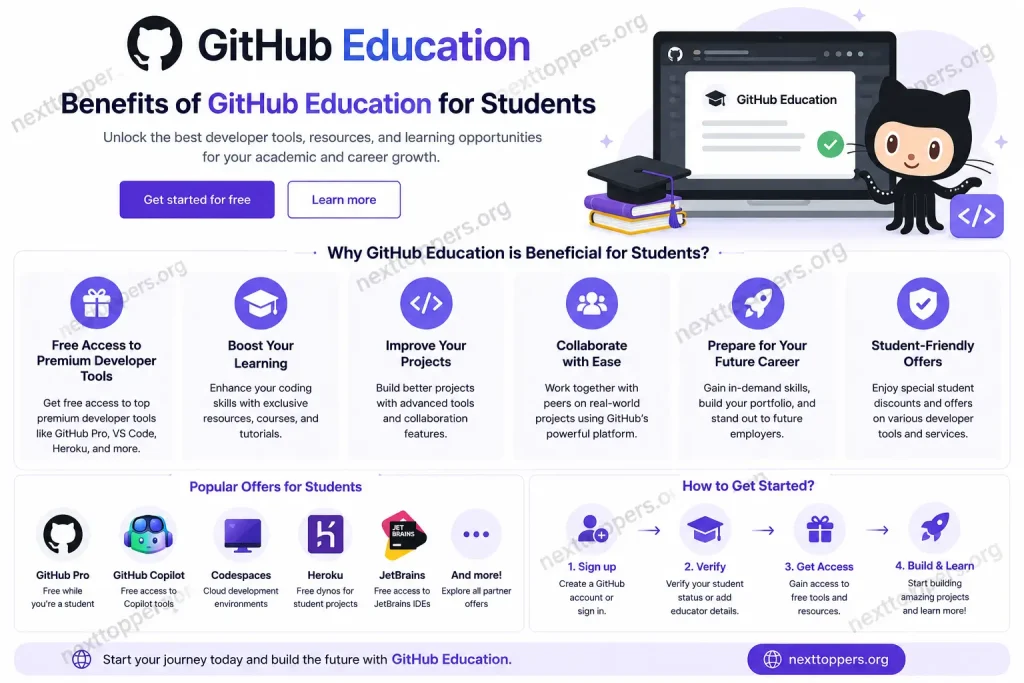
Benefits of GitHub Education for Students
GitHub Education offers many useful features that help students learn coding in a practical way. It gives access to real developer tools that are used in the tech industry. This makes learning easier, faster, and more professional for beginners.
Here are the main features explained in simple points:
- Free Developer Tools: Students get free access to premium tools used by professionals. These tools help in coding, testing, and building projects without any cost.
- GitHub Student Developer Pack: This is a special package that includes free software, cloud services, and learning resources for students. It supports hands-on practice.
- GitHub Codespaces: It allows students to write and run code directly in the browser. No setup is needed, which makes learning simple.
- Learning Resources: GitHub provides tutorials and guides that help beginners understand programming step by step.
How to Get Started with GitHub Education
Getting started with GitHub Education is simple and useful for students. First, you need to create a GitHub account and apply for the student program. After approval, you can access free tools and resources. These tools help you learn coding, build projects, and gain real experience in software development.
Once you are approved, you can start using the Student Developer Pack. It gives you access to professional tools used in real tech companies. You can practice coding, host projects, and improve your skills step by step. It is a great way for beginners to enter the world of programming.
Create a GitHub Account
To begin, visit the GitHub website and sign up for a free account. This account will be your main place for coding and projects. You will use it to store your work, share code, and collaborate with others in the developer community.
Apply for GitHub Education
After creating your account, go to the GitHub Education page. Fill out the application form with your student details. You may need to provide proof like a school ID or email. This step is important to verify that you are a student.
Start Using Developer Tools
Once approved, you can access free tools from the Student Developer Pack. These tools help you build websites, write code, and learn faster. You can practice real projects and improve your programming skills step by step.
Key Features of GitHub Education
GitHub Education provides many helpful features for students and beginners. It is designed to make learning coding simple and practical. Students can use real developer tools, build projects, and improve their skills without paying any cost. It is one of the best platforms for starting a tech journey.
Here are the key features explained in simple points:
- Free Developer Tools: Students get access to professional tools used in the software industry. These tools help in coding, testing, and project development in a real environment.
- GitHub Student Developer Pack: It includes free services like hosting, cloud credits, and software tools. This helps students learn by doing real projects.
- GitHub Codespaces: It allows coding directly in the browser. No installation is needed, which makes it easy for beginners.
- Learning Resources: GitHub provides guides, tutorials, and documentation. These help students understand coding step by step and improve their skills quickly.
Tips to Make the Most of GitHub Education
GitHub Education gives students many free tools, but using them in the right way is very important. If you use it smartly, you can learn faster and build strong coding skills. It is not just about getting tools, but about practicing regularly and building real projects step by step.
Here are some useful tips explained simply:
- Start Small Projects: Begin with easy coding projects like a calculator or to-do list. This helps you understand basic programming concepts clearly.
- Practice Daily Coding: Try to code every day, even for a short time. Regular practice improves your problem-solving skills.
- Use GitHub Copilot: If available, use it to get coding suggestions. It helps you learn faster and write better code.
- Contribute to Open Source: Work on real projects with other developers. This builds experience and improves teamwork skills.
Frequently Asked Questions (FAQs)
What is the main purpose of GitHub Education?
The main purpose of GitHub Education is to help students learn real coding skills by giving them free access to professional developer tools and resources.
Is GitHub Education only for computer science students?
No, it is for all students interested in technology. Even beginners from other fields can use it to learn programming step by step.
Do students need to pay for GitHub Education tools?
No, all tools provided under GitHub Education and the Student Developer Pack are completely free after student verification.
Can beginners without coding experience use GitHub Education?
Yes, beginners can start learning from zero. It provides simple tools and guides that help new learners understand programming easily.
Does GitHub Education help in getting a job?
Yes, it helps students build real projects and a portfolio, which can improve their chances of getting internships and jobs in tech fields.
Conclusion
GitHub Education is a very helpful program for students and beginners who want to start learning coding. It provides free access to powerful developer tools, learning resources, and the Student Developer Pack. With these tools, students can practice real-world programming and improve their technical skills step by step. It removes the problem of high cost and gives equal learning opportunities to everyone.
GitHub Education is a great starting point for anyone interested in technology. It helps learners build projects, gain experience, and grow confidence in coding. By using it regularly, students can prepare themselves for future jobs in software development. It is not just a learning platform, but a complete guide for building a strong tech career from the beginning.